
AI Strategy
AI Visibility Analytics: Why GA4 Underreports AI Traffic

Marketers today are living in a fantasy world. They wake up, check their Google Analytics (GA4) dashboard, see a steady line of "Users" and "Sessions," and think they understand their audience.
I'm here to tell you that if you're relying on GA4 to track the most important trend in SEO right now (AI-driven search) you're basically flying blind.
Here's the cold, hard truth: Google Analytics was built for a web where humans use browsers. It was not built for a web where LLMs use crawlers to "ingest" your site before a human ever sees a single pixel.
I’ve been digging into the server logs for AI+Automation and comparing them to what GA4 reports. The results? It’s not just a "gap." It’s a total black hole.
In this post, I’m going to explain exactly why GA4 is missing 90% of your AI interactions and why you need to stop trusting the "JavaScript Trap" if you want to survive the next two years of search.
🤔 THE PROBLEM: THE JAVASCRIPT TRAP
Google Analytics (GA4) is a beautiful piece of software, but it has a fundamental flaw: it’s lazy.
By default, GA4 uses a tracking code (gtag.js). This script is like a doorbell. It only rings if someone - or something - reaches out and physically executes the code in a browser-like environment.
Here's how that breaks down for bots:
• Sophisticated Bots: Googlebot and some advanced scrapers can execute JavaScript. They might trigger your GA4 tag, but Google usually filters them out of your main reports using the IAB Spiders and Bots list. You literally never see them.
• Basic Crawlers: A simple Python script using requests or a basic crawler doesn't execute JS. To GA4, these visits don't exist. They are "ghosts" on your server.
• AI Ingestion Bots: This is the new category. Bots like GPTBot, ChatGPT-User, and PerplexityBot are designed for extreme efficiency. They want the text, and they want it now. They often skip the JS execution to save resources.
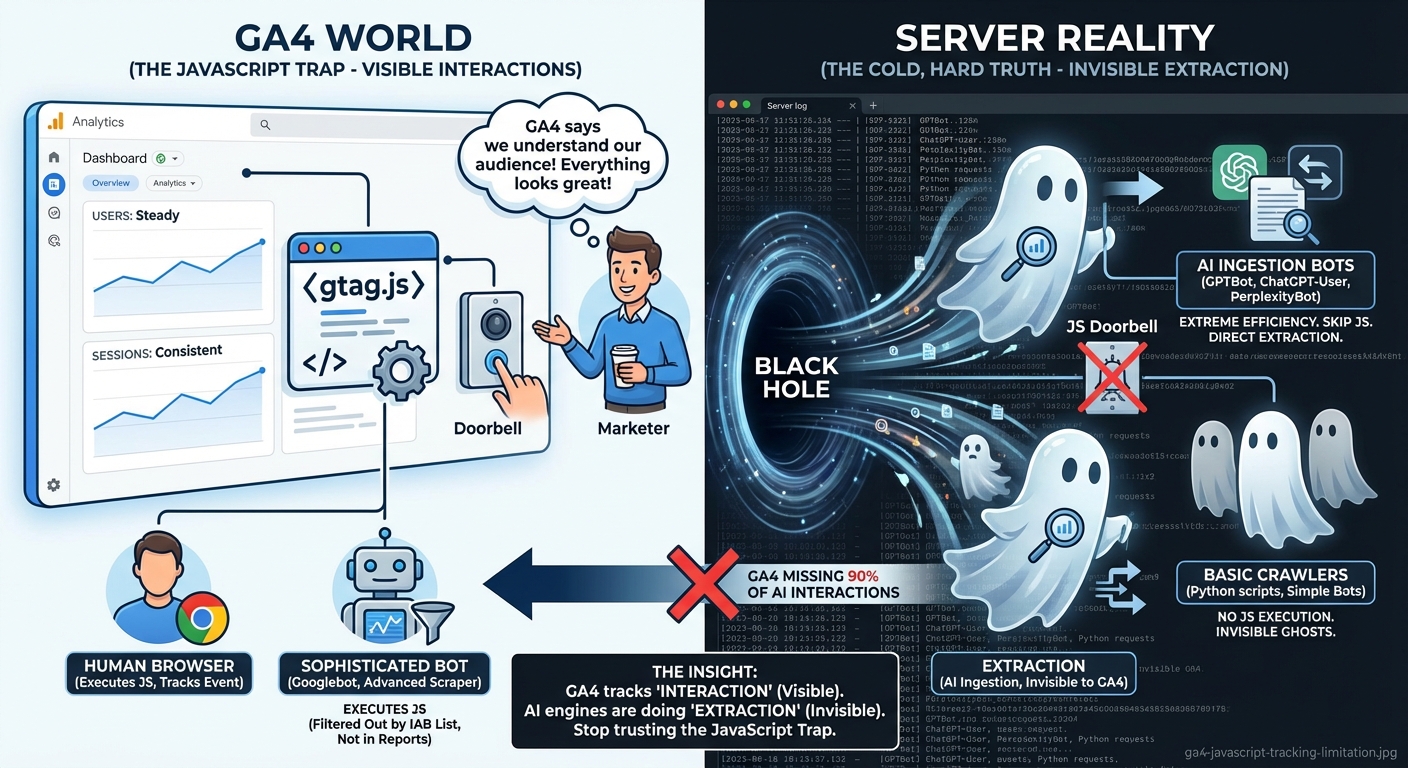
The result? You could have Perplexity "reading" your entire site 50 times a day to answer user queries, and your GA4 dashboard will show exactly zero activity from them.
The Insight: GA4 only tracks "interaction." AI engines are doing "extraction." Those are two very different things, and one is currently invisible to your marketing team.
📊 THE INGESTION VS. REFERRAL GAP
This is where the math gets really scary. A lot of people think, "As long as the AI sends me traffic, I'm happy."
But there are actually two distinct ways an AI chatbot interacts with your site, and GA4 handles them with the grace of a sledgehammer.
1. The Crawler (The Silent Majority)
When a user asks ChatGPT or Perplexity a question, the AI sends a bot to fetch your content. This is the "Ingestion" phase. These bots are the ones actually reading your data. They are almost always invisible to GA4 because they don't run scripts.
2. The Human Referral (The Visible Minority)
If the AI is feeling generous and includes a citation link, and a human actually clicks it, then they show up in GA4.
But here is the "Gap" I'm seeing in my data:
| Activity | Visibility in GA4 | Visibility in Server Logs |
|---|---|---|
| AI Bot Crawling | Invisible | 100% Visible |
| Human AI Referrals | Visible | 100% Visible |
| Content Extraction | Invisible | 100% Visible |
In my own experiments, for every 1 human who clicks a citation link from an AI, the AI bots have crawled the site anywhere from 10 to 30 times.
Here's the actual measured ratio from a recent 30-day window on aiplusautomation.com:
| Metric | Value | Source |
|---|---|---|
| Total AI bot requests | 9,662 | Edge middleware logs |
| Unique AI bots seen | 11 | User-agent classification |
| Top crawler | ChatGPT (672 requests) | Server logs |
| AI-source human sessions | 6 | GA4 referral data |
| AI-source human users | 3 | GA4 |
| Crawl-to-human ratio | 1,610 : 1 | Computed |
Yes, 1,610 to 1. For every one human session GA4 attributed to an AI source, our middleware caught 1,610 bot requests it could not see. The "10 to 30 times" was conservative on a per-page basis. At the site level, the multiplier is two orders of magnitude bigger.
If you're only looking at GA4, you think your "AI traffic" is low. In reality, your content is being processed at a scale you haven't even begun to measure.
🧠 THE "GHOST USER" & THE DIRECT TRAFFIC BLACK HOLE
Even when AI does send you a human visitor, GA4 often mangles the data.
The Statelessness Problem:
AI chatbots are stateless. Every time they fetch a page for a user, they appear as a brand-new user from a brand-new session. If they were to execute JS (which some do), they would constantly inflate your "New Users" count while tanking your "Engagement Rate."
How can a user be "engaged" when the bot just wants to grab a quote and leave in 50 milliseconds?
The Referrer Black Hole:
This is the one that drives me crazy. Many AI platforms strip "Referrer" information. When someone clicks a link inside the ChatGPT mobile app or a private Perplexity window, it often shows up in GA4 as Direct Traffic.
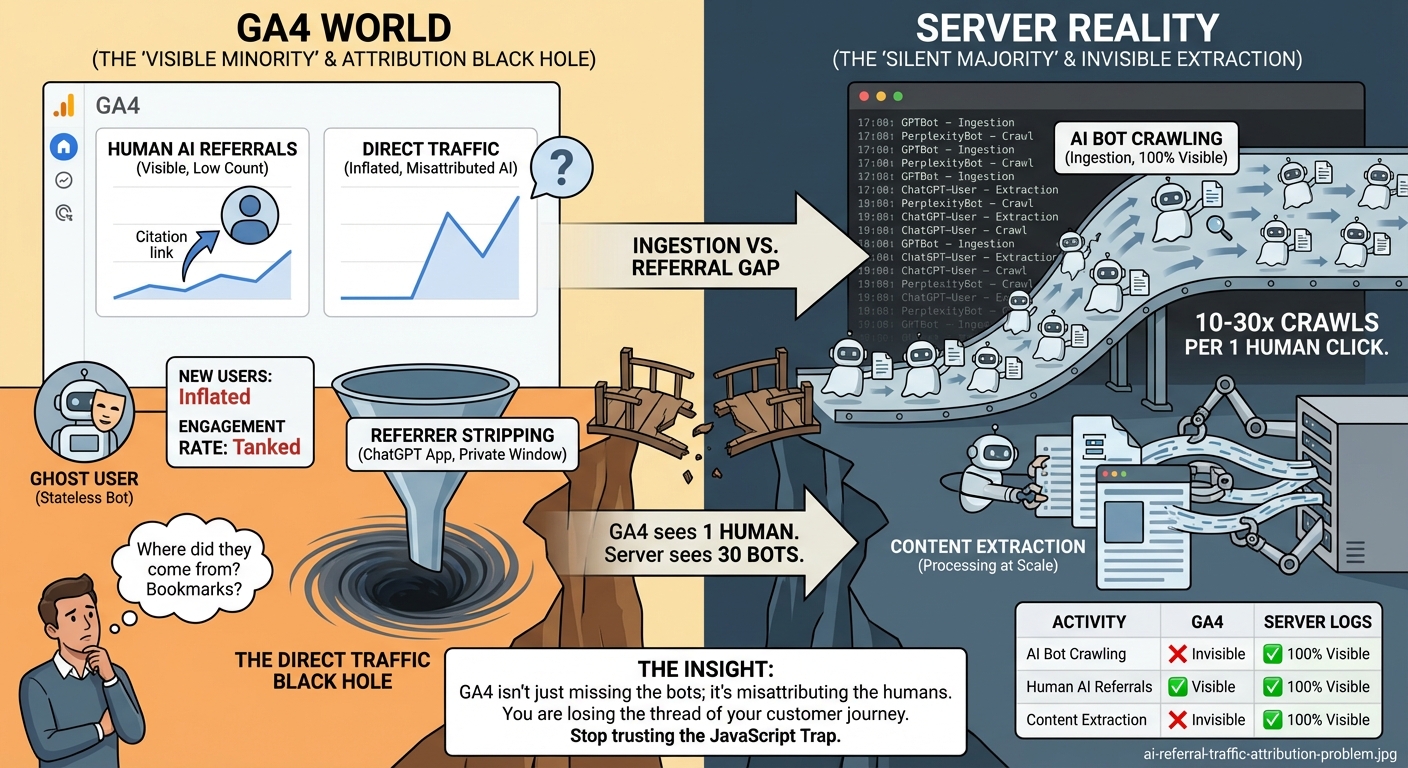
You think someone bookmarked your "10 Best SEO Tips" post. In reality, ChatGPT just recommended it to 5,000 people, and you have no way of knowing.
The Insight: GA4 isn't just missing the bots; it's misattributing the humans. You are losing the thread of your customer journey.
🛠️ THE SOLUTION: SERVER-SIDE TRUTH (WHY BOTSIGHT IS NECESSARY)
If you want to know what's actually happening on your site, you have to go back to the source: the Server Logs.
Every single time a bot, a human, or a toaster hits your URL, your server logs it. It doesn't care about JavaScript. It doesn't care about cookies. It just logs the request.
This is why I built BotSight. It’s not just "another analytics tool." It’s an "Analytics Truth Sensor."
Here is what server-side tracking (the "BotSight Way") gives you that GA4 can't:
1️⃣ 100% Bot Detection: We see every GPTBot, ClaudeBot, and rogue scraper in real-time.
2️⃣ Contextual Ingestion Tracking: We don't just see that they visited; we see what they grabbed. Did they crawl your price list? Your documentation? Your blog?
3️⃣ Refined Referral Mapping: We use advanced User-Agent filtering and IP tracking to identify AI referrals even when the "Referrer" header is stripped.
4️⃣ Zero Performance Impact: Because we track at the server/middleware level, there's no heavy JS script slowing down your site (which, ironically, helps you rank better with AI bots anyway).
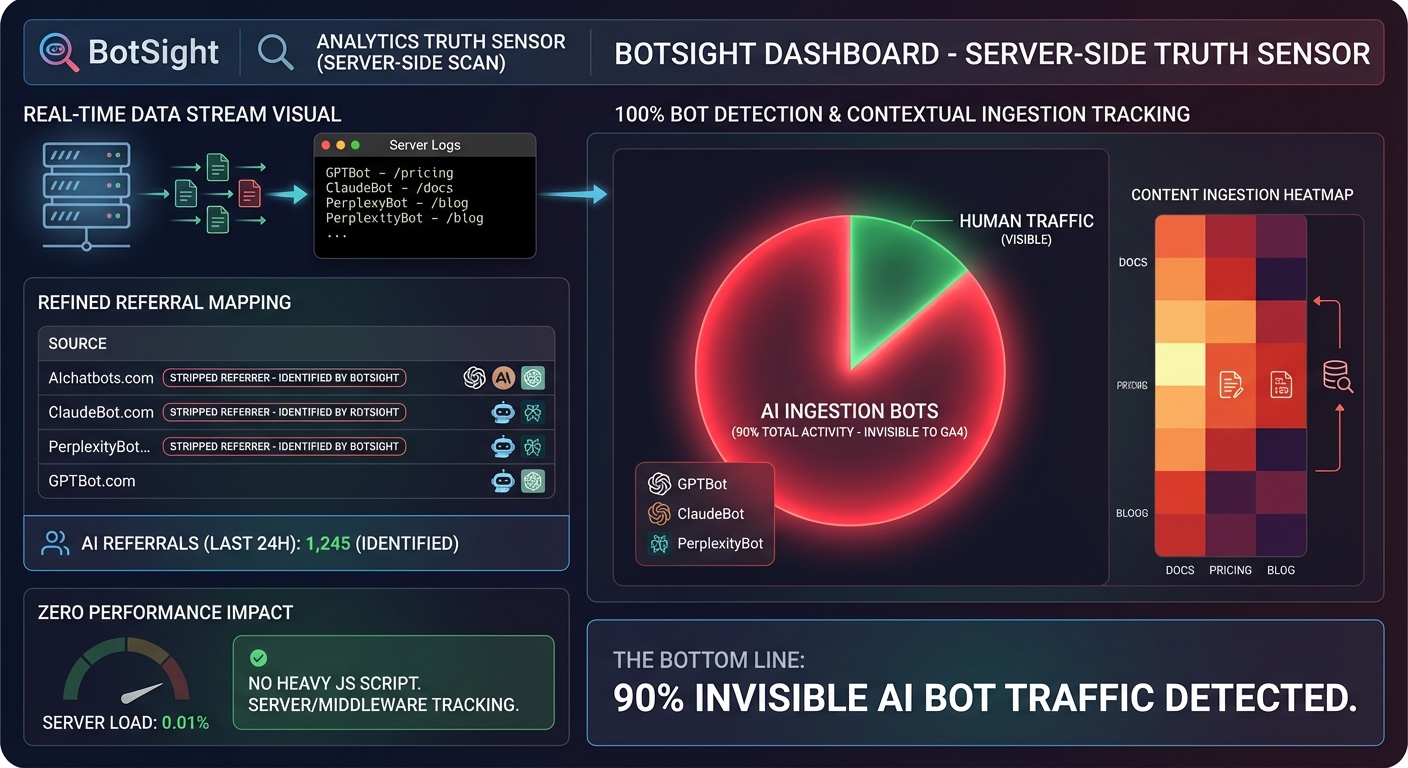
The Bottom Line: If you're not tracking at the server level, you're only seeing the tip of the iceberg. The other 90% is AI bots eating your lunch.
🛠️ THE PLAYBOOK: HOW TO CLOSE THE GAP
You don't have to be a data scientist to start fixing this. Here is exactly how I'm changing my reporting structure for 2026:
1️⃣ Move Beyond GA4 for AI SEO
Keep GA4 for your human marketing metrics (conversions, bounce rates, etc.), but stop using it to measure the success of your AI content. It’s the wrong tool for the job.
2️⃣ Implement Middleware/Server Logging
Whether you use a tool like BotSight or build your own custom logger in Vercel/Cloudflare, you MUST have a record of every request. Looking at your Nginx or Apache logs once a week is a good start.
3️⃣ Search for specific "AI User-Agents"
For a full breakdown of tracking methods and tools, see our AI bot tracking tools and methods comparison. Run a regular scan of your logs for these strings:
gptbot- ChatGPT botchatgpt-user- ChatGPT user agentoai-searchbot- SearchGPT (OpenAI search)claude- Claudeanthropic- Claude/Anthropic AIperplexity- Perplexity AIgoogle-extended- Google's Geminigoogleagent- Google Agent (Gemini)bard- Google Bard (old name for Gemini)bytespider- TikTok AI crawlermeta-externalagent- Meta AIamazonbot- Amazon Q
4️⃣ Test Your Visibility
Ask ChatGPT or Perplexity about your site. Then immediately check your server logs. Did you see the bot hit your page? If not, why? Are you accidentally blocking them in robots.txt? Is your server too slow for them to wait?
5️⃣ Use Regex Filters for Humans
If you must use GA4 to try and track human referrals, set up a Custom Channel Group with this Regex:
(chatgpt|openai|perplexity|claude|gemini|anthropic)\.ai|com
It won't catch everything, but it's better than nothing.
🔍 PER-PLATFORM REFERRER ATTRIBUTION: WHO STRIPS WHAT
Not all AI platforms strip referrers equally. Here is what we observe on inbound human traffic:
| Source | Sends a usable Referer? | What GA4 shows |
|---|---|---|
| perplexity.ai | Yes (most cases) | perplexity.ai / referral |
| chatgpt.com | Sometimes (browser-dependent) | Often (direct) / (none) |
| claude.ai | Yes (most cases) | claude.ai / referral |
| gemini.google.com | No (passes through Google ecosystem) | Either google / organic or (direct) |
| ChatGPT iOS / Android app | No | (direct) / (none) |
| Perplexity iOS app | Inconsistent | (direct) / (none) or perplexity.ai / referral |
| Claude iOS app | No | (direct) / (none) |
If most of your AI-source humans arrive via the mobile apps, your GA4 "Direct Traffic" segment is silently absorbing them. The fix: filter Direct Traffic by landing page. Sessions that land on a deep blog post or research page directly are almost never bookmark traffic. They are usually attribution-stripped AI referrals.
📈 WHAT THE BOT TRAFFIC PATTERNS ACTUALLY LOOK LIKE
Once you have server-side logging in place, traffic patterns become diagnostic. A few patterns we see across monitored sites:
- Steady weekly cadence with weekend dips indicates training crawlers (GPTBot, ClaudeBot) on a scheduled batch. Their traffic looks like a regular sine wave.
- Burst-and-quiet patterns indicate on-demand fetchers (ChatGPT-User, Claude-User) responding to user queries. Traffic spikes correlate with content topicality (a news event in your space pulls in a wave).
- Single-page stickiness means one URL is the model's preferred answer source for a cluster of queries. Worth knowing which page that is and protecting it.
- Sudden drop-offs are often indexation problems: the URL got deprecated in Bing, the page got slower than the bot's timeout, or your robots.txt accidentally added a Disallow directive.
- Sudden surges from a single bot can mean training-data refresh cycles (ClaudeBot batch crawls) or a competitor's content getting de-ranked, putting you next in line.
GA4 cannot show you any of these patterns because they happen entirely in the bot layer. Server-side or middleware logging makes them visible.
⚠️ WATCH OUT FOR: THE "BOT-SKEW" TRAP
A word of warning: once you start seeing the real data, your numbers are going to look "worse."
Your total traffic might go up (because you're finally seeing the bots), but your "Average Engagement Time" will plummet. Don't panic.
This is the "Good Skew." It means your content is so valuable that the most powerful AI models on the planet are reading it every hour. That is a success metric GA4 isn't smart enough to celebrate.
🤔 ANYTHING I MISSED?
The "AI Analytics Gap" is only going to get wider. As AI engines move toward "Agentic" workflows -where they browse the web for hours to complete complex tasks for users -the number of invisible, non-JS visits to your site is going to explode.
Stop checking your doorbell and start checking your security cameras. If you need help closing the gap, the right AI SEO agency can set up proper server-side tracking from day one.
Are you seeing the same gaps I am? Have you checked your server logs lately?
CHEERS!