AI Strategy
The RAG Architectu2019s Guide: Mastering RAG Data Preparation
2026-01-30
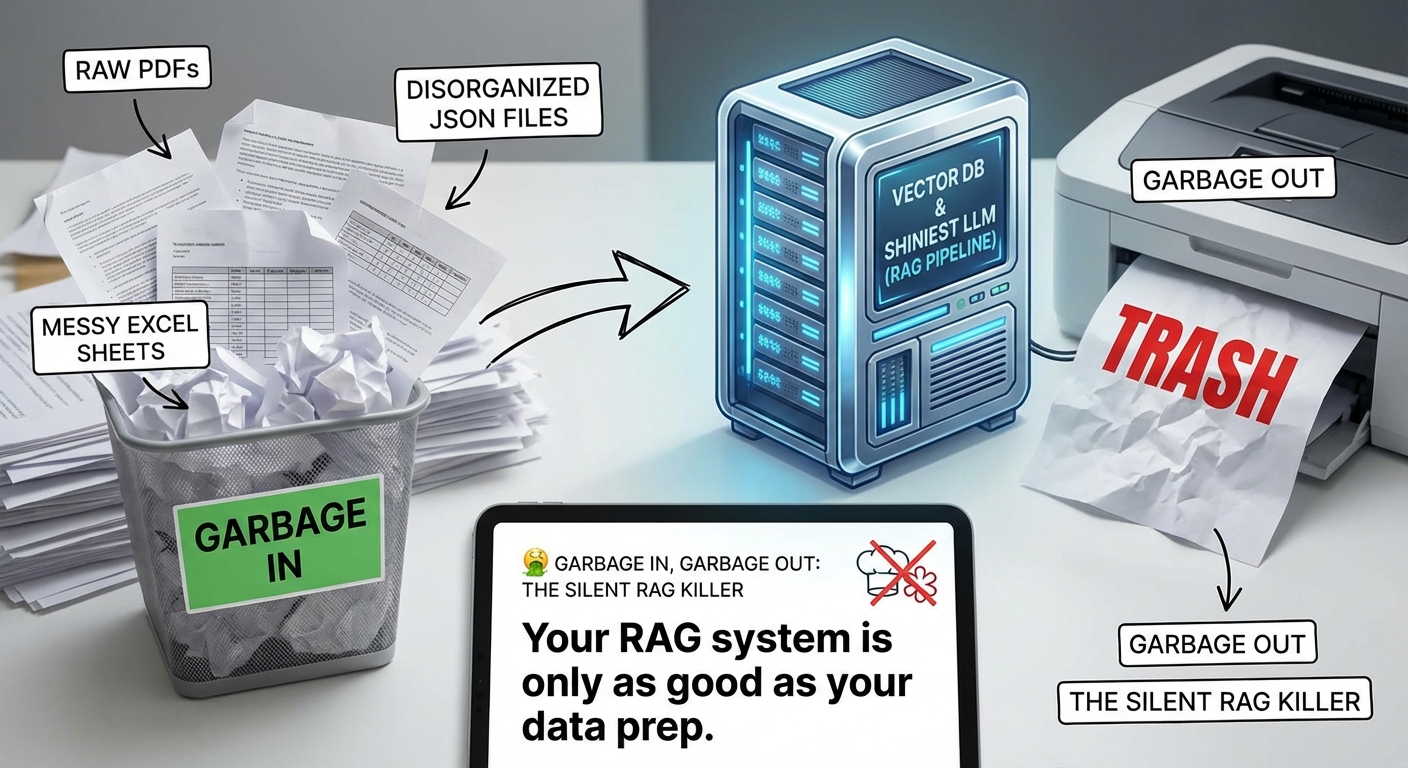
🤮 GARBAGE IN, GARBAGE OUT: THE SILENT RAG KILLER
I've seen it a hundred times. A team builds a gorgeous RAG (Retrieval-Augmented Generation) pipeline. They use the latest vector DB, the shiniest LLM, and a complex re-ranking step.
And yet, the output is... well, it's trash.
Why? Because they treated their data like a dumpster. They threw in raw PDFs, messy Excel sheets, and disorganized JSON files, expecting the LLM to just "figure it out."
The data was wild.
Here's the truth: Your RAG system is only as good as your data prep. If you don't clean the kitchen, don't expect a Michelin-star meal.
In this post, I'm sharing my personal RAG data prep philosophy. It's a no-nonsense approach to "The Great Reduction"—stripping away the noise and delivering pure, high-signal context to your models.
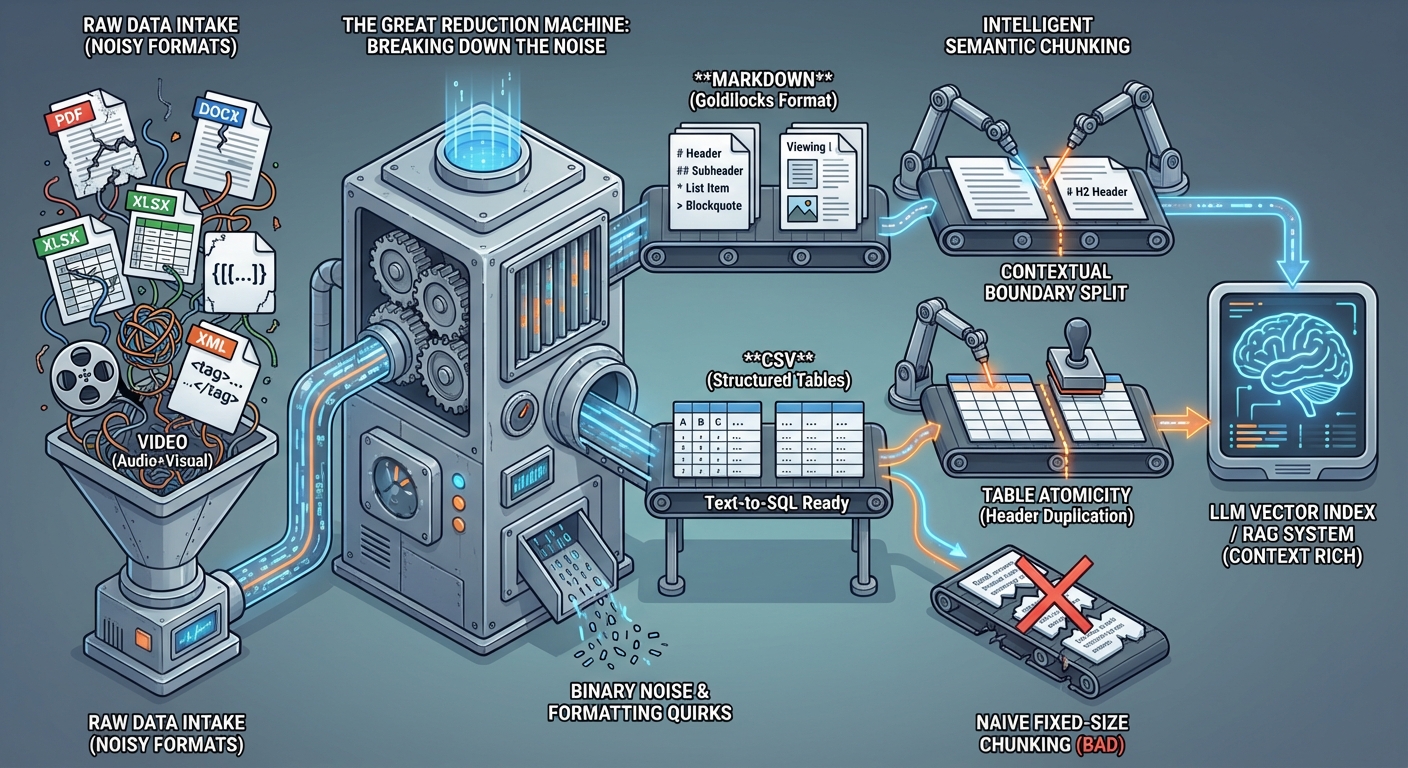
🧪 THE "GREAT REDUCTION": BREAKING DOWN THE NOISE
My first rule of data prep is simple: Reduce everything to its smallest, cleanest component in a format LLMs actually love.
LLMs are world-class at parsing text and structured tables. They are not world-class at navigating the weird structural quirks of a .docx header or the hidden formatting of a .xlsx workbook. They get distracted by XML tags, binary noise, and inconsistently nested JSON.
Here’s my conversion playbook:
| Input Format | Conversion Strategy | Target Format |
|---|---|---|
| Documents (PDF, DOCX) | Strip formatting, preserve structure, extract titles as headers | Markdown |
| Spreadsheets/Tables (XLSX, JSON, HTML) | One file per "sheet"; keep headers intact | CSV |
| Video | Transcribe (Whisper) + OCR (frame-by-frame) + Image Description (multimodal) | Markdown |
| Audio | High-fidelity Transcription with speaker diarization | Markdown |
| Images | OCR (for text) + Semantic Description (for context) | Markdown |
Why Markdown?
Markdown is the "Goldilocks" format for LLMs. It’s light on tokens but rich in structure (#, ##, *, >). It tells the model exactly what is a header, what is a list, and what is a blockquote without the confusing overhead of HTML or XML. When an LLM sees a #, it immediately understands the hierarchy of the context.
Why CSV?
If you give an LLM a mess of nested JSON, it spends half its "brainpower" just making sense of the brackets and keys. CSV is raw, efficient, and perfect for the Text-to-SQL workflows we’ll talk about later. It allows for direct mapping of columns to database schemas with zero ambiguity.
The Video Extraction Paradox
Most people just take the closed captions from a video. That's a mistake. If a speaker says "As you can see in this diagram," and that diagram isn't in your text index, your RAG system is blind.
My approach: Use a multimodal model (like Gemini Pro Vision) to "watch" the video every 5-10 seconds. Extract any text on screen (OCR) and write a descriptive paragraph of the visual state. Combine this with the transcript into a single Markdown "Viewing Log."
🧠 INTELLIGENT CHUNKING: BEYOND THE NAIVE SPLIT
Most people use "fixed-size chunking." They take 500 characters, overlap by 50, and call it a day.
This drives me crazy.
Naive chunking breaks sentences in half. It loses context. It turns a coherent paragraph of technical documentation into two useless fragments that confuse the vector index.
The Semantic Strategy: Context Over Count
I prefer Semantic Chunking based on the document type. You need to respect the boundaries the original author created:
- For Docs: Break only at headers (
H2,H3). If a section is too long, use a recursive split that prioritizes paragraph breaks. - For Lists: Never break a list across two chunks. An item in a list ("1. Add the API key") is useless without the preceding context ("How to configure the client").
- For Tables: A table is a single atomic unit. If you must split a large table, duplicate the header row for every chunk so the "meaning" of the columns isn't lost.
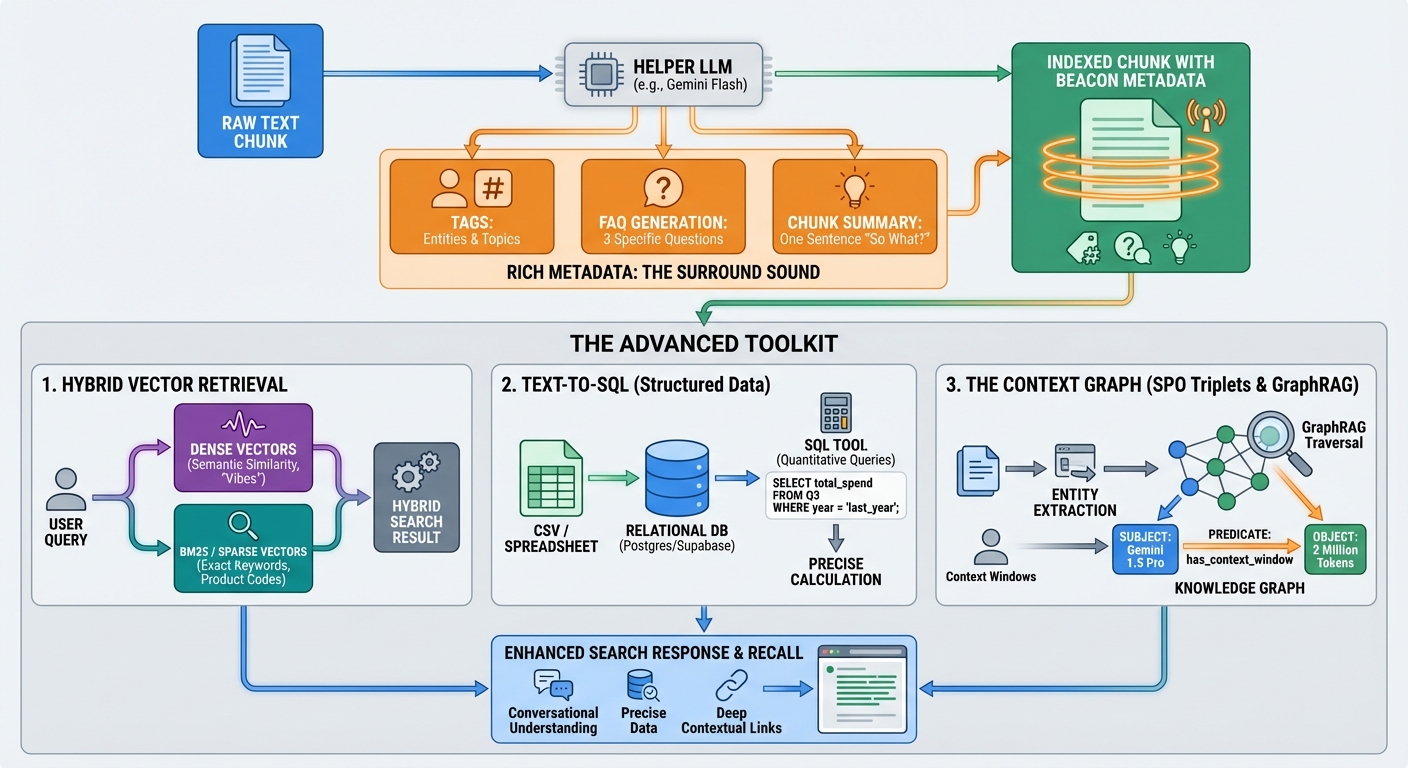
📊 RICH METADATA: THE SURROUND SOUND OF RETRIEVAL
A chunk of text in a vacuum is hard to find. You need to wrap it in high-signal metadata that acts like a "beacon" for your search engine.
Whenever I process a chunk, I don't just store the text. I use a "Helper LLM" (like Gemini Flash) to generate:
- Tags: Specific entities (people, products) and broad topics.
- FAQ Generation: "What 3 specific questions does this chunk answer perfectly?"
- Chunk Summary: A one-sentence summary that captures the "so what?" of the section.
This metadata is indexed alongside the text. When a user asks a question, we don't just search the text; we search the intent captured in the FAQs. This significantly improves recall for conversational queries.
🛠️ THE ADVANCED TOOLKIT: HYBRID, SQL, AND GRAPHS
Once the data is clean, you can stop playing "Junior Varsity" RAG and move to the pros.
1. Hybrid Vector Retrieval
Vector search (Cosine Similarity) is great for "vibes" and semantic meaning. It's terrible for specific keywords, product codes, or non-dictionary terms (like "Project X-45-Delta").
I always use Hybrid Search:
- Dense Vectors for semantic similarity.
- BM25 / Sparse Vectors for exact keyword matching.
Clean, Markdown-formatted data makes this 10x more effective because there's no "formatting noise" like CSS classes or HTML tags to pollute the frequency index.
2. Text-to-SQL (Keep Your Tables Intact!)
This is why we convert spreadsheets to CSVs and store them in a relational database like Postgres/Supabase, not just a vector store.
For quantitative questions ("What was the total spend in Q3 compared to last year?"), vector search will guess. SQL will calculate. By keeping your tables as structured CSVs, you can give your LLM agent a sql_tool to query the data directly. The Insight: Don't turn numbers into "paragraphs." Keep them as structure.
3. The Context Graph (SPO Triplet Extraction)
This is the "final form" of data prep. During the reduction phase, I run an entity extraction pass to identify Subject-Predicate-Object triplets to build a Knowledge Graph.
# Example Knowledge Graph Triplet
{
  "subject": "Gemini 1.5 Pro",
  "predicate": "has_context_window",
  "object": "2 Million Tokens"
}
By organizing these into a Knowledge Graph, you enable GraphRAG. If a user asks about "Context Windows," the graph can traverse the "has_context_window" relationship to find "Gemini 1.5 Pro," even if that model isn't mentioned in the immediate text chunk.
💡 HYBRID SEARCH: THE SECRET SAUCE OF RECALL
Most RAG developers rely solely on Vector Search (Dense Retrieval). They index their data using an embedding model and search for "similar vibes."
This is where things break.
Vector search is incredible at finding concepts ("Tell me about AI ethics"), but it's fundamentally broken for exact matches ("Find invoice #9842-A"). This is why Hybrid Search is non-negotiable in a production pipeline.
The BM25 + Vector Combo
I always recommend a dual-path retrieval strategy:
- Keyword Path (BM25): Traditional full-text search. It weights rare words (like part numbers or unique names) heavily.
- Semantic Path (Vector): Finds the conceptual neighborhood of the user's query.
By combining the results (using something like Reciprocal Rank Fusion), you get a system that can handle both "vague questions" and "specific lookups."
But here's the catch: Hybrid search only works if your data is clean. If your Markdown conversion is messy—if you have raw HTML tags or "junk" tokens in your index—they act as "static" in your keyword frequency counts, dragging down your precision. This is why "The Great Reduction" is the foundation of everything else.
🛠️ THE PLAYBOOK: YOUR CLEAN DATA CHECKLIST
If you're building a RAG pipeline today, here is your 4-step prep playbook:
1️⃣ The Purge: Remove all non-essential files. If the data is 5 years old and irrelevant, it doesn't belong in the index. 2️⃣ The Conversion: Standardize on Markdown for text and CSV for tables. Use multimodal models for Video/Image extraction. 3️⃣ The Enrichment: Run an LLM pass to add Summaries and FAQ Metadata to every chunk. 4️⃣ The Triplet Pass: Identify the top 50 entities in your domain and map their relationships for your Knowledge Graph.
💡 PRO TIP
When converting Video, don't just use the transcript. Use a Multimodal model to describe what's happening on screen. "A man points to a whiteboard showing a diagram of a neural network" is a signal that a transcript alone will miss.
⚠️ WATCH OUT FOR
Chunk Size Drift. Even with semantic chunking, keep an eye on your token counts. If a chunk is consistently over 1,000 tokens, you're introducing too much noise for the LLM. Aim for the "sweet spot" of 400-600 tokens per chunk for maximum precision.
The Bottom Line:
Data preparation isn't the "boring part" of AI. It IS the AI.
In the world of 2026, where every developer has access to the same powerful models, the winners won't be the ones with the best prompt—they'll be the ones with the cleanest context.
Treat your data prep like a master tailor treats a suit—cut out the excess, reinforce the seams, and make sure it's perfectly tailored to the intelligence you're trying to build.
CHEERS!